Introducing: Scope MCP
Know If Your Project Fits Your Plan Before You Start
Every serious Claude Code user has hit the wall. You're three hours into a refactor, momentum is good, and then you hit a wall — rate limit. You either wait, pay for extra usage, or you lose track of your work.
The frustrating part isn't hitting the limit. It's that you could have seen it coming.
Scope is an MCP server that tells you whether your project fits inside your plan before you write a single line of code — and which model to use for each phase of work.
————————
The problem with how we plan AI projects
Most people treat an AI coding session like a gamble - you start coding and hope you make it to the end. If you run out of tokens halfway through, you improvise.
The tools that exist to help don't actually solve this. Cost calculators show you dollar amounts, but you never see dollar amounts when you're working in Claude Code. You see a rate limit error. The gap between "this costs $3" and "this will consume 40% of your weekly Opus budget" is the gap between a metric that feels abstract and one that changes how you plan.
Scope works in the unit that actually matters: session length x time
————————
How it works
Scope is an MCP server with two tools.
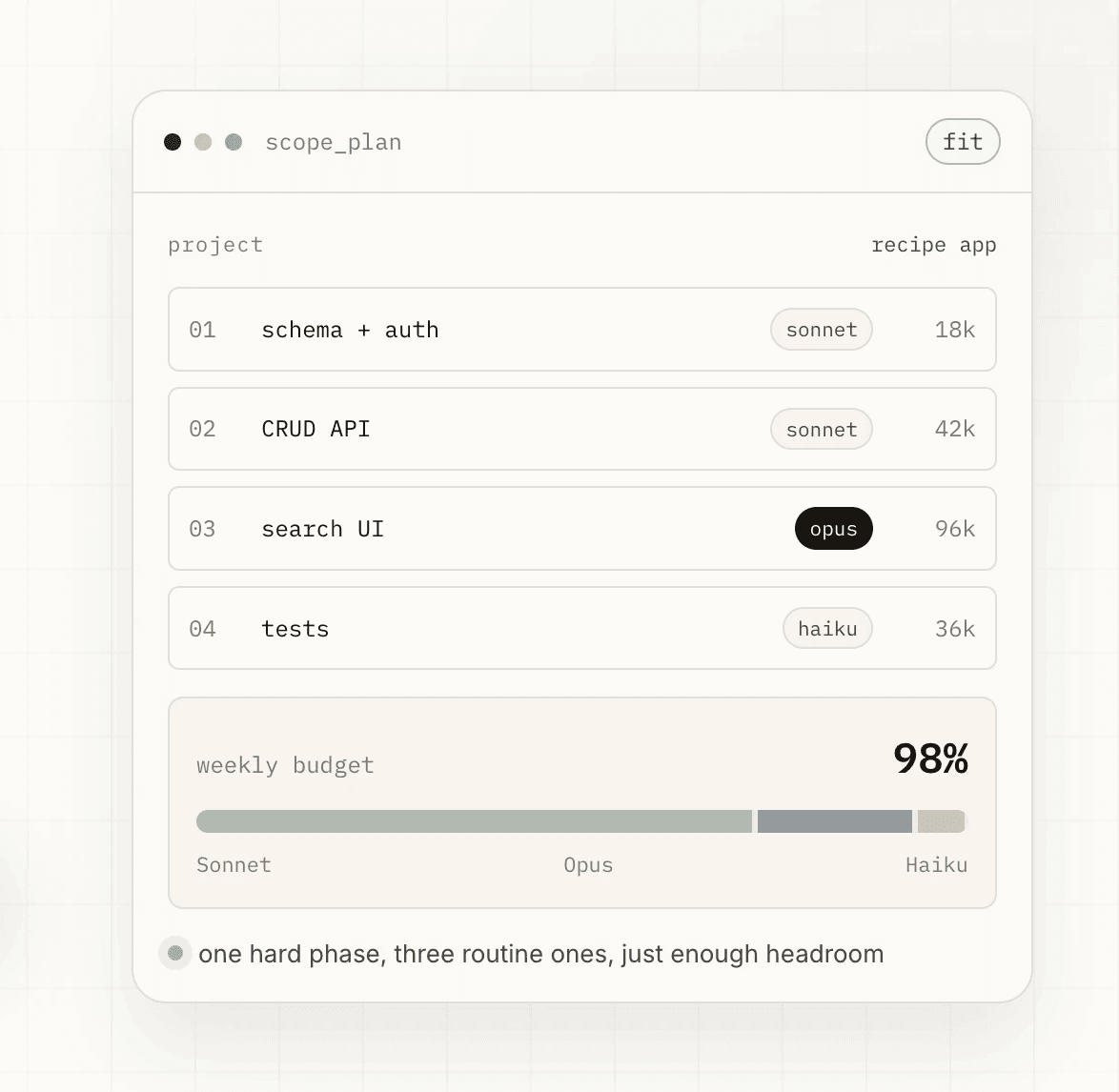
scope_plan takes your project — decomposed into phases by Claude Code from your actual repo — and returns a fit verdict against your plan tier. It tells you which model to use for each phase, why, and whether the whole thing fits in one week or needs to be spread across two.
scope_execute takes that plan and hands you an execution brief for each phase: which model to switch to, the exact opening prompt to start the work, and what "done" looks like so you know when to stop and checkpoint.
The routing isn't based on cost. It's based on what each phase actually needs. Architectural decisions go to Opus — the cost of a wrong direction exceeds the token savings. Well-specified scaffolding goes to Haiku. Everything in between goes to Sonnet. Each recommendation cites the heuristic that drove it so you can push back if the reasoning doesn't fit your situation.
————————
What it looks like in practice
I ran Scope on a credit card audit tool I was building. First pass, treating it as a greenfield project:
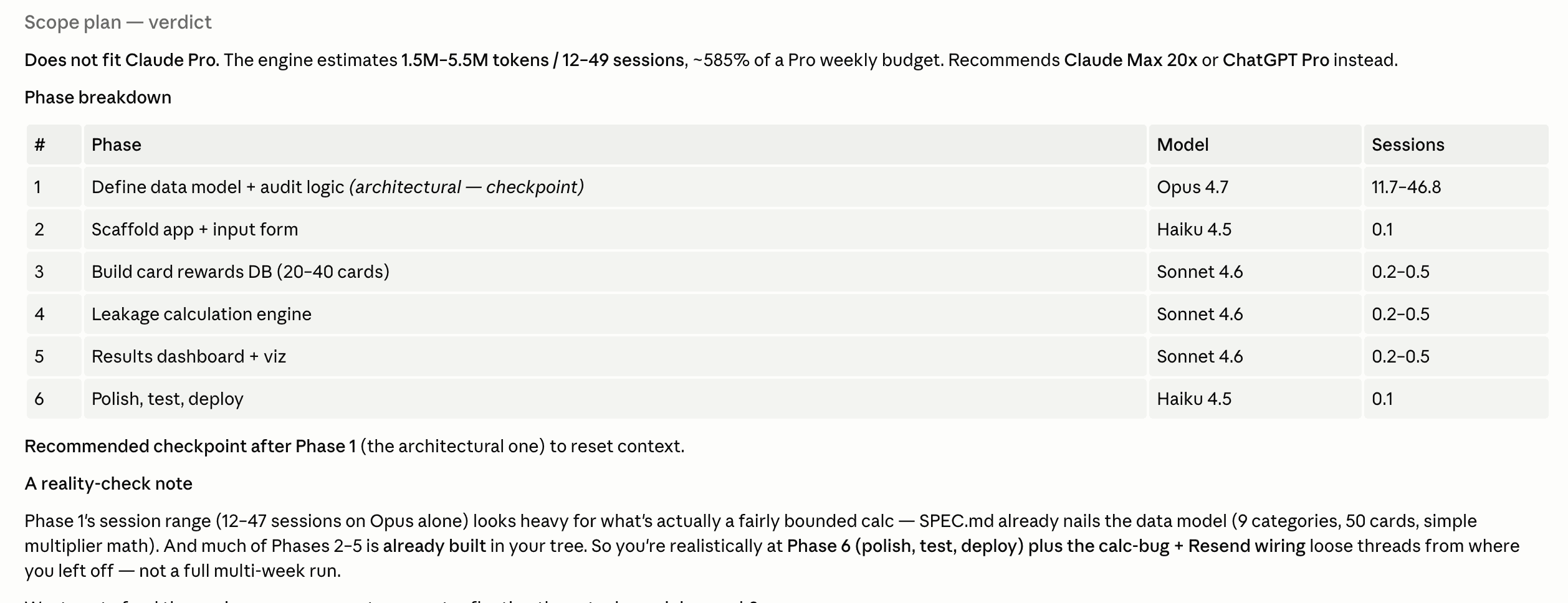
❌ Does not fit Claude Pro — ~585% of weekly frontier budget. Fits on Claude Max 20x or ChatGPT Pro.
That's a real signal. Six phases, Opus on the architectural one, Sonnet for the meaty middle work, 13–50 sessions total.
But the project wasn't greenfield. Most of it was already built. I gave Scope the actual project state and ran it again:
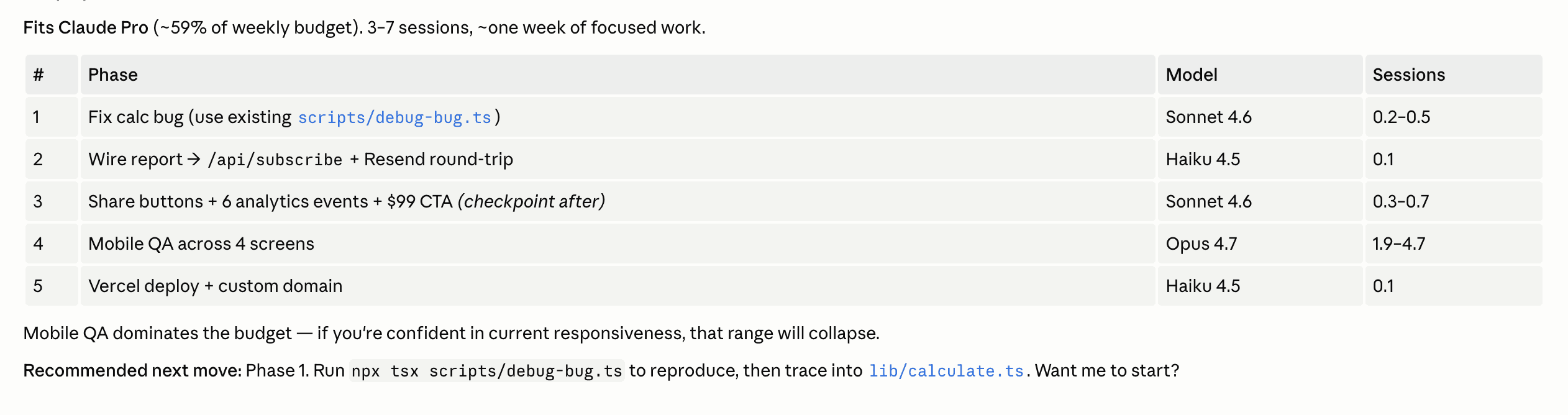
✅ Fits Claude Pro (~59% of weekly budget). 3–7 sessions, ~one week of focused work.
Same project. Completely different verdict. The difference is context — and context is exactly what Claude Code has when it constructs the phases array from your repo before calling the tool.
That delta is the whole product. A static cost calculator would have given you the first number and left you to figure out the rest. Scope gives you the second number, the one that's actually true, and tells you what to do next.
Install
Add this to your Claude Code MCP config:
No API key required. Then in any Claude Code session:
Scope this project. I'm on Claude Pro.
Claude Code reads your repo, builds the phase breakdown, and calls the tool. You get a plan card and an execution brief for phase 1.
What's next
The reference data — plan limits, benchmark scores, model performance — is maintained manually right now and updated as things change. Anthropic doubled Claude Code limits five days ago; the config reflects that.
Next up: an agent refresh loop that checks for updates automatically and opens a PR when something changes. And eventually a hosted version with no config required at all — just install and go.
For now, it's a sharp tool for the people who need it most: solo builders running multi-day projects in Claude Code who want to know what they're getting into before they start.
View on GitHub · Install via npm